
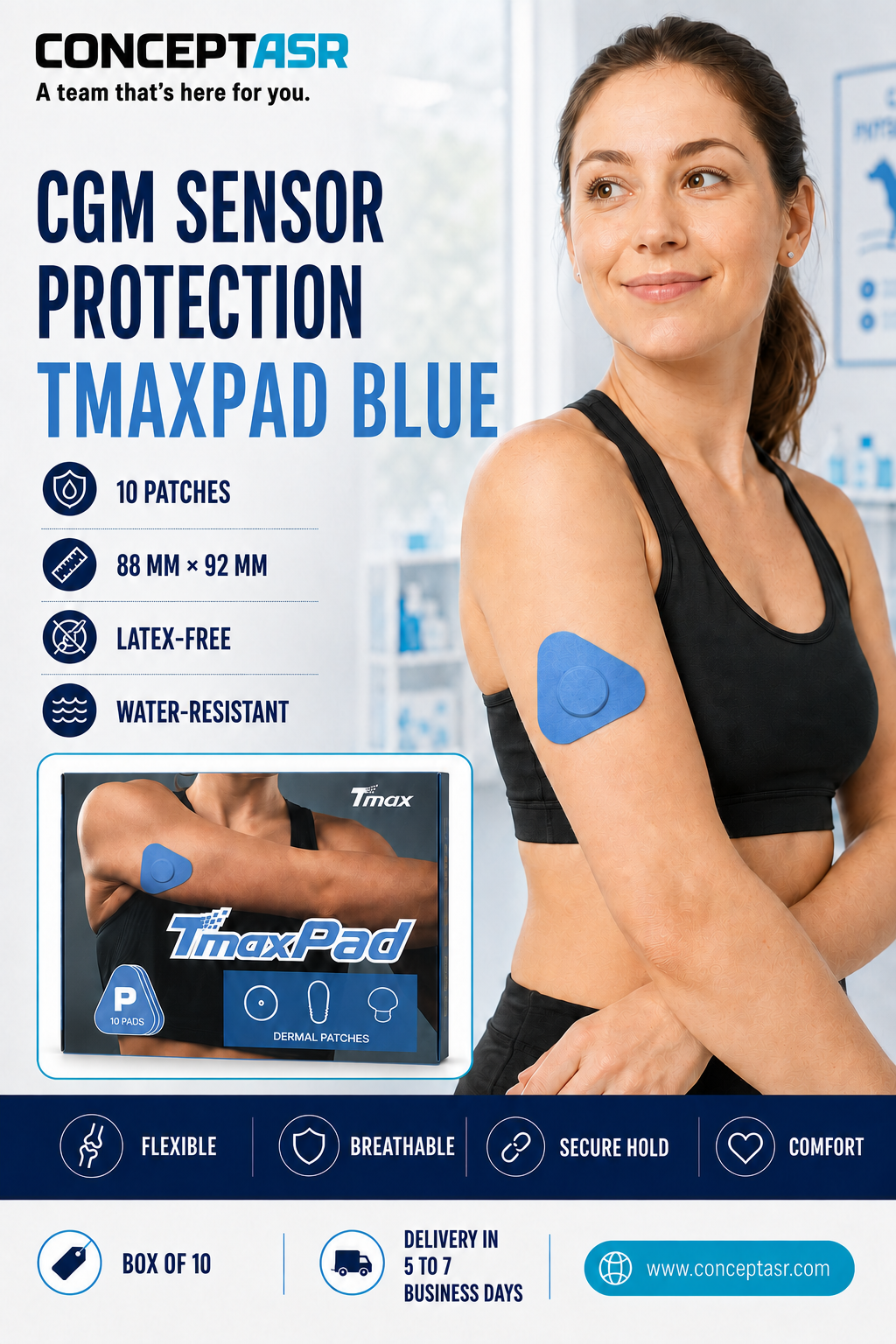
The blue CGM sensor patch from TmaxPad is designed to provide additional coverage around a continuous glucose monitoring sensor during everyday activities. Its fresh blue colour creates a clean and distinctive appearance while helping cover the area surrounding the sensor.
Each patch measures 88 mm × 92 mm and features a centre opening intended to fit around several commonly used continuous glucose monitoring sensor formats. Because CGM devices vary in shape, size and installation requirements, users should compare the dimensions of the patch with their sensor before use and follow all instructions supplied by the sensor manufacturer.
Additional coverage around the sensor
Continuous glucose monitoring sensors are generally worn for several days. During this period, the original sensor adhesive can be exposed to clothing, normal body movement, perspiration, moisture and accidental contact.
The blue CGM sensor patch provides an additional layer around the device and helps cover the edges of the sensor’s original adhesive. It may be useful for users who want extra coverage during work, travel, exercise or ordinary daily activities.
The patch is a complementary accessory. It does not replace the sensor’s original adhesive, its installation system or the application instructions provided by the CGM manufacturer.
Flexible construction for everyday wear
TmaxPad patches are made from a lightweight and flexible material designed to follow the natural contours of the body. Their broad shape provides coverage around the sensor while the centre opening keeps the device accessible.
The flexible material moves with the skin during normal activities. Applying the patch correctly and without excessive stretching helps reduce unnecessary tension and promotes more comfortable wear.
The product uses an acrylic adhesive and does not contain natural rubber latex. It is also water-resistant for ordinary exposure to moisture. Actual adhesion and wear time may vary according to the user’s skin, application technique, activity level, perspiration, humidity and exposure to water.
Preparing the skin
Proper skin preparation is important for obtaining the best possible adhesion. Before applying the blue CGM sensor patch, make sure the sensor has been installed correctly according to the manufacturer’s directions.
The surrounding skin should be clean, completely dry and free from lotion, cream, body oil, sunscreen or any other substance that could interfere with the adhesive. If the skin has been cleaned, allow it to dry fully before applying the patch.
Do not apply the product to irritated, injured, infected or unusually sensitive skin.
Applying the patch
Carefully remove the protective backing while avoiding unnecessary contact with the adhesive surface. Position the centre opening around the continuous glucose monitoring sensor without covering the device or placing pressure directly on it.
Gently lower the patch onto the skin. Smooth the material outward from the centre, then press carefully across the surface and along the edges to promote even adhesion.
Do not overstretch the material during application. Excessive tension may cause discomfort, irritate the skin or contribute to the premature lifting of the patch edges.
Allow the adhesive sufficient time to settle before exercising, showering or exposing the area to significant moisture.
Removing the patch carefully
When removing the blue CGM sensor patch, slowly lift one edge and gently peel the material back while keeping it close to the surface of the skin. Avoid pulling quickly or directly upward.
Support the skin with one hand and gradually remove the patch with the other. Take special care around the centre opening to avoid accidentally loosening or removing the CGM sensor.
Always follow the sensor manufacturer’s directions for removing any adhesive accessory placed near the device.
Important precautions
The blue CGM sensor patch is intended for external use only. Discontinue use if redness, itching, swelling, pain or another skin reaction develops. Consult an appropriate healthcare professional when necessary.
The patch does not guarantee that a continuous glucose monitoring sensor will remain attached in every situation. Adhesive performance may be affected by skin type, skin preparation, movement, perspiration, humidity, prolonged water exposure and environmental conditions.
The continuous glucose monitoring sensor shown in the product photographs and illustrations is not included. The package contains only the adhesive protective patches.
Product features
- Blue protective patch for CGM sensors
- Clean and colourful appearance
- Flexible material designed to move with the skin
- Acrylic adhesive
- Latex-free construction
- Water-resistant for everyday activities
- Dimensions: 88 mm × 92 mm
- Box of 10 patches
- CGM sensor not included
- Delivery within 5 to 7 business days
A colourful choice for CGM users
The blue CGM sensor patch combines practical coverage with a fresh and easily recognizable colour. It is suitable for users who want additional protection around their continuous glucose monitoring sensor while adding a colourful touch.
TmaxPad protective patches are also available from ConceptASR in pink, beige and Panda designs. Each colour or pattern is listed as a separate product so customers can select the specific appearance they prefer.
For best results, prepare the skin carefully, position the centre opening accurately and apply the patch without excessive tension. Inspect the application area regularly. Remove or replace the patch if it becomes loose, damaged, uncomfortable or excessively wet.


Reviews
There are no reviews yet.